Semi-In-Ear Earbuds Sound Thin: Acoustic Physics and Practical Fixes

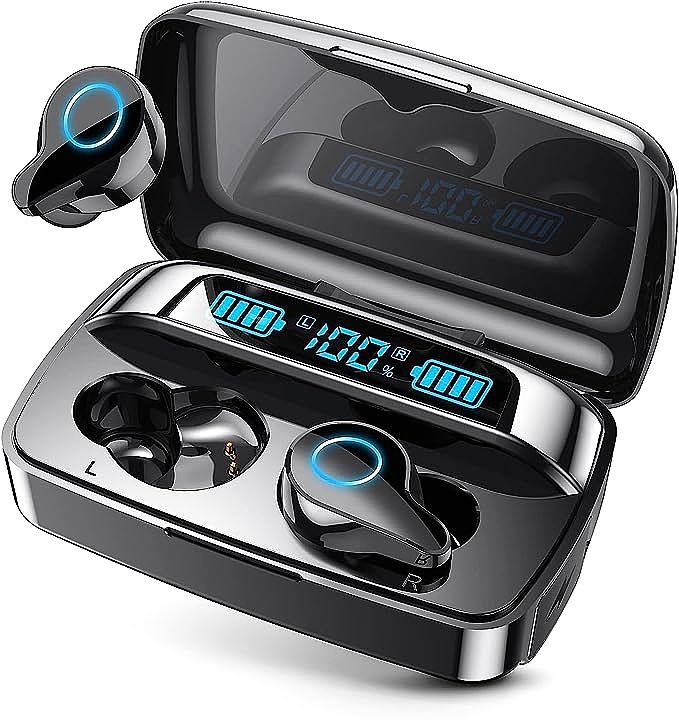
UMIDIGI AirBuds U Wireless Earbuds
The bass sounds weak. Not just a little weak, but noticeably thin in contrast to your old sealed earbuds. You press the earbuds deeper into your ears, and suddenly the low frequencies emerge, full and present. Release the pressure, and the bass vanishes again. This is the fundamental trade-off of semi-in-ear design, and understanding why it happens reveals how to work around it.
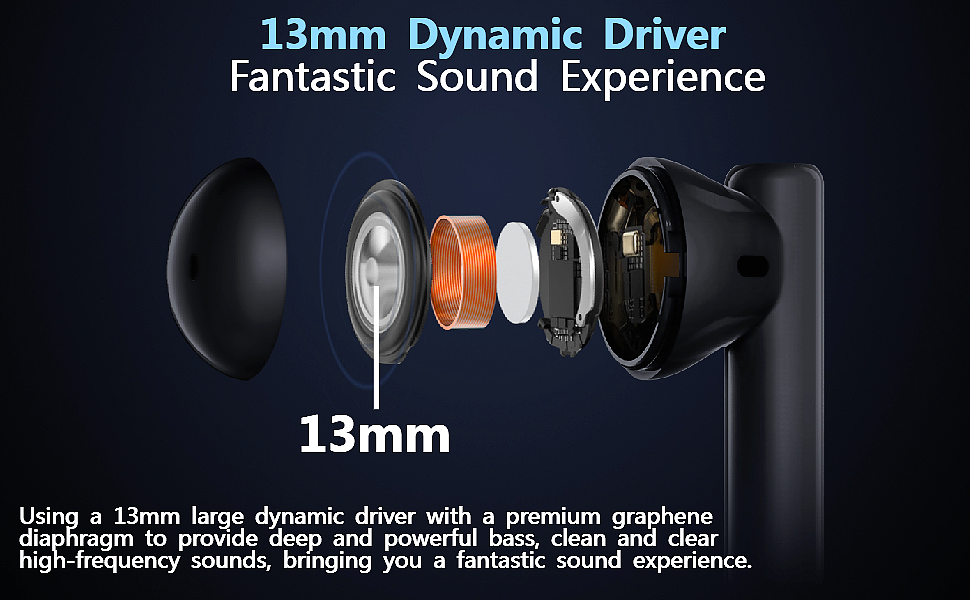
The UMIDIGI AirBuds U, like many semi-in-ear earbuds, uses a 13mm graphene-coated driver that should theoretically deliver substantial low-frequency output. Yet users frequently report that the bass feels underwhelming. The driver is not the problem. The acoustic environment is.

The Physics of Acoustic Seals
Sound is pressure. More precisely, sound is rapid fluctuations in air pressure that propagate as waves. When a speaker driver moves forward, it compresses air in front of it. When it moves backward, it rarefies that air. Your eardrum detects these pressure changes and your brain interprets them as sound.
Low frequencies present a unique challenge. A 50Hz bass note has a wavelength of approximately 6.8 meters. To create a perceivable pressure change at such long wavelengths, the driver must move a significant volume of air. This is why subwoofers are large: they need to displace substantial air volume to generate audible low-frequency pressure.
In sealed in-ear monitors, the driver and your eardrum share a closed air cavity. When the driver moves, the air in that cavity has nowhere to go. The pressure changes directly and efficiently transfer to your eardrum. This is acoustic coupling at its most effective.
Semi-in-ear designs break this seal. The earbud rests against the outer ear but does not penetrate the ear canal. Air can flow freely between the driver and the external environment. When the driver pushes forward at low frequencies, some of that air pressure escapes through the gaps rather than reaching your eardrum. The result is a measurable loss of 10 to 15 decibels in the low-frequency range in contrast to sealed designs.
This is not a defect. It is an inherent property of open acoustic systems. Recording studios have known this for decades. Open-back headphones, prized for their natural soundstage, exhibit the same low-frequency attenuation. The trade-off is intentional: comfort and awareness in exchange for bass impact.
Why EQ Alone Cannot Fix It
The obvious solution seems simple: boost the bass frequencies using equalization. The UMIDIGI app offers six EQ presets, including a subwoofer mode designed to enhance low frequencies. But EQ has fundamental limitations when the acoustic seal is compromised.
When you boost the 50Hz region by 6dB, you are asking the driver to produce approximately four times the acoustic power at that frequency. The driver complies, but here is the problem: the leakage paths remain open. The additional bass energy you requested splits in two directions. Some reaches your ear. The rest escapes into the surrounding air.
This creates two practical issues. First, you are wasting battery power on sound that never reaches your ear. Second, the increased driver excursion at low frequencies can introduce distortion, particularly in small drivers operating near their mechanical limits. You might hear a muddy, indistinct bass rather than the tight, controlled low end you were seeking.
Professional audio engineers understand this principle. When mixing on open-back headphones, they apply less low-frequency boost than they would on sealed monitors, knowing that the acoustic leakage will prevent the intended effect. The same wisdom applies here: EQ can help, but it cannot override physics.
The Geometry of Sound: Why Rotation Matters
In 2021, an Amazon reviewer named arubamon discovered something interesting. By rotating the AirBuds U approximately 90 to 180 degrees from their intended orientation, the bass response improved substantially. The reviewer upgraded their rating from 4 to 5 stars based on this finding alone.
This is not a placebo effect. The mechanism is acoustic geometry.
When you rotate a semi-in-ear earbud, three things change simultaneously. First, the driver angle relative to your ear canal entrance shifts. Sound waves are directional at higher frequencies but become increasingly omnidirectional at lower frequencies. However, the initial launch angle still matters. A driver pointed directly into the ear canal will couple more efficiently than one firing at an angle.
Second, the contact between the earbud housing and your outer ear changes. The human ear has complex topography: the concha, the antihelix, the tragus. These structures can form partial acoustic barriers when an object presses against them in the right orientation. A rotated earbud might create a small enclosed volume between the driver and the ear canal entrance, approximating a partial seal.
Third, the distance between the driver and the ear canal may decrease. Sound intensity follows an inverse-square relationship with distance in free field conditions. In the constrained geometry of the outer ear, the relationship is more complex, but the principle holds: closer is generally louder.
The effectiveness of this technique varies significantly between individuals. Ear shape is highly variable. What works for one person may not work for another. Some users report dramatic improvements. Others notice little change. The only way to know is to experiment.
Practical Implementation: A Systematic Approach
If you want to explore the rotation technique, start with a consistent test signal. A sine wave sweep from 20Hz to 200Hz will reveal how different positions affect low-frequency response. Many free tone generator apps can produce these signals.
Begin with the earbuds in their standard orientation. Note the perceived volume and clarity of the low frequencies. Then rotate the left earbud approximately 45 degrees clockwise, keeping it seated in your ear. Listen again. Continue rotating in 45-degree increments until you have completed a full rotation. Repeat the process for the right earbud.
Pay attention to two factors: bass response and stability. A position that sounds excellent but allows the earbud to fall out is not practical. The goal is finding a stable orientation that also improves acoustic coupling.
For many users, the optimal position falls between 90 and 180 degrees from the intended orientation. The earbud stem may point upward or backward rather than downward. This looks unconventional, but function matters more than appearance.
Once you find a promising position, test it with actual music. Synthetic tones reveal frequency response, but music reveals how that response translates to real listening. Choose tracks with prominent bass lines that you know well. Compare the standard and rotated positions.
Combining Physical and Digital Adjustments
The rotation technique addresses the physical side of the equation. EQ addresses the signal side. Used together, they can produce better results than either approach alone.
Start with the physical adjustment. Find a stable, improved position through rotation. Then apply modest EQ adjustments. The key word is modest. A 3dB boost in the 60-120Hz region is often sufficient when the acoustic coupling has already been improved. Avoid the temptation to apply extreme boosts.
It provides a subwoofer preset that boosts low frequencies. This can serve as a starting point, but the default settings may be too aggressive. If the app allows custom EQ curves, consider a gentle shelf boost starting around 80Hz rather than a steep peak at 50Hz. The former sounds more natural. The latter can sound artificial and boomy.
Also consider the upper frequencies. When low frequencies are emphasized, the perceived balance of the entire spectrum shifts. A slight reduction in the 2-4kHz range can restore equilibrium without making the sound dark or muffled.
The Graphene Factor: Material Science in Budget Audio
The graphene-coated driver in this price range represents a deliberate engineering choice. Graphene, a single layer of carbon atoms arranged in a hexagonal lattice, won the 2010 Nobel Prize in Physics for its discoverers. Its acoustic properties are genuinely useful for speaker diaphragms.
A speaker diaphragm needs two conflicting properties: stiffness to push air efficiently without flexing, and low mass to respond quickly to electrical signals. Traditional materials require trade-offs. Metal diaphragms are stiff but heavy. Paper is light but flexible. Graphene offers both high stiffness and low mass simultaneously.
For budget earbuds, this material choice matters. A 13mm graphene driver can produce cleaner transients and extend to lower frequencies than a conventional driver of the same size. But the material advantage is wasted if the acoustic environment leaks the sound away before it reaches your ear.
This is why the rotation technique is particularly relevant for graphene-equipped semi-in-ear designs. The driver is capable. The enclosure geometry is the limiting factor. By improving the acoustic coupling through positioning, you allow the driver to perform closer to its potential.

Understanding the Limits
No technique can fully overcome the fundamental physics of open acoustic systems. Semi-in-ear designs will never match sealed in-ear monitors for low-frequency impact. The air gap is always present. Some leakage is inevitable.
The goal is optimization within constraints. A 10-15dB deficit might become a 5-7dB deficit through careful positioning and EQ. That is a meaningful improvement. It will not satisfy listeners who prioritize bass above all else. But for users who value the comfort and situational awareness of semi-in-ear designs, the trade-off becomes more favorable.
Battery life also enters the equation. Extreme EQ boosts consume more power. The driver must work harder to produce the boosted frequencies. If you find yourself applying maximum bass boost to achieve acceptable results, consider whether a different earbud design might better suit your preferences.
The Broader Context: Design Philosophy and User Expectations
Semi-in-ear designs exist for specific reasons. They are more comfortable for extended wear. They allow ambient sound to reach the ear, which is valuable for outdoor activities and office environments. They avoid the occlusion effect that makes your own voice sound hollow and internal body sounds unnaturally loud.
These are genuine advantages. The bass limitation is the price paid for those advantages. Understanding this trade-off helps set realistic expectations. A $20 semi-in-ear earbud will not sound like a $200 sealed in-ear monitor. But it can sound better than its default configuration suggests.
The rotation technique is not a hack or a workaround. It is an application of acoustic principles that the manufacturer could not fully optimize because ear shape varies too widely between individuals. What works for one ear may not work for another. The user becomes the final engineer, adjusting the system to match their specific anatomy.
This is not unique to earbuds. Musical instruments require similar individual adjustment. Guitar action height, saxophone mouthpiece position, drum tuning: all depend on the player's body and preferences. Audio playback is not so different. The sound chain extends from the recording studio to your eardrum, and the final link is your ear.
Closing Thoughts
The thin bass of semi-in-ear earbuds is not a mystery. It is acoustics behaving exactly as physics predicts. Open systems leak pressure. Low frequencies require pressure. The math is straightforward.
What is less straightforward is how users respond to this limitation. Some accept it as the price of comfort. Others seek sealed alternatives. A third group experiments, adjusting what can be adjusted: position, angle, EQ settings.
The rotation technique will not work for everyone. Ear geometry is too variable for universal solutions. But for those whose ears allow it, the improvement can be substantial. A few millimeters of repositioning can change the acoustic environment enough to matter.
The next time you hear thin bass from semi-in-ear earbuds, remember: the driver is probably working correctly. The sound is simply taking the path of least resistance, which leads away from your ear rather than toward it. Redirect that path, and the bass follows.
UMIDIGI AirBuds U Wireless Earbuds
Related Essays

How Compact Speakers Defy Bass Physics
Wired vs Wireless Earbuds: How to Choose Which is Right for You

: Apple AirPods Pro (2nd Generation) Wireless Earbuds – Immersive Audio Experience

Lankey Pro U-AIR4 Ear Buds Wireless Bluetooth Headphones

KLIM Fusion Earbuds with Microphone - A Perfect Blend of Comfort and Quality

Tiiyee Earphones – Recommended for High Quality Sound and Radiation Reduction

Gasy Bzhe Wireless Earbuds Bluetooth 5.0 Headphone - A Budget-Friendly Option

The Physics of Acoustic Sealing: Why Fit Is the Foundation...