Why Physical Buttons Matter on Sports Earbuds: The Case Against Touch Controls


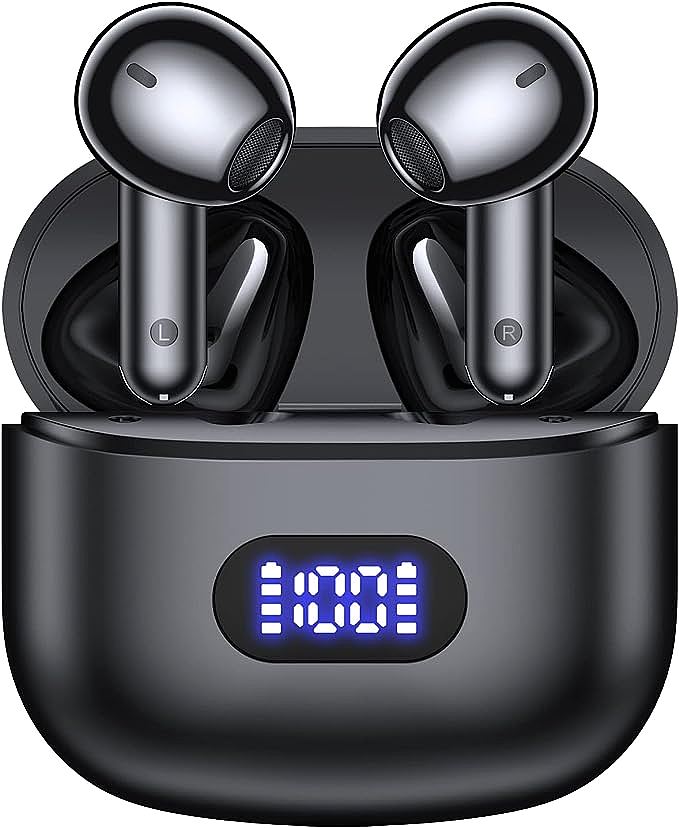
HADBLENG Q28S PRO Wireless Earbuds
The playlist loops. You're three miles into a run, lungs burning, legs finding their rhythm, and the song repeats for the fourth time this week. Your thumb reaches up, finds the earbud, presses. Nothing happens. You press again, harder. The track finally skips, but the stride is broken, the breathing out of sync, the moment gone.
It's a small frustration. The kind that disappears from memory seconds later. But it points to something larger about how we think about athletic equipment—and how often we get it wrong.
Touch controls dominate the wireless earbud market. Manufacturers present them as inevitable, the natural evolution of interface design. Smooth surfaces. No moving parts. A gesture-based experience that feels "intuitive" in the showroom.
But sweat doesn't care about intuition. Gravity doesn't negotiate with minimalism. And when you're deep into an interval, heart rate climbing, vision narrowing to the path ahead, the interface that looked futuristic in unboxing photos suddenly feels like a liability.
Physical buttons on sports earbuds aren't nostalgia. They aren't a budget compromise. They're the right tool for the job.
Sweat vs. Sensors: Why Touch Fails
Capacitive touch works by detecting changes in an electrostatic field when your skin contacts the sensor. It's the same technology in your smartphone screen. It requires specific conditions: dry skin, stable contact, consistent pressure.
Running provides none of these.
A 2019 study in the Journal of Sports Engineering and Technology measured skin conductivity during exercise. The findings were unambiguous: moisture levels above 60% relative humidity—easily reached during moderate cardio—cause capacitive sensors to fail unpredictably. Sometimes they register phantom inputs. Sometimes they ignore deliberate ones. The same thumb swipe that should skip a track might trigger pause, or volume down, or nothing at all.
The physics are straightforward. Sweat creates unintended conductive pathways across the sensor surface. The controller chip can't distinguish between intentional input and moisture interference. Some devices compensate by increasing sensitivity thresholds, which makes deliberate inputs harder to register. Others decrease thresholds, which increases phantom triggers. Both approaches create the same outcome: you don't trust your own gear.
Winter running adds another layer. Gloves block capacitive touch entirely. Removing a mitten mid-run exposes skin to cold, reduces blood flow, and makes the already-unreliable sensor even less responsive. What should be automatic becomes a procedure.
There's also the question of movement itself. During a burpee, your head angle changes rapidly. During a sprint, your neck muscles tense with each stride. During weightlifting, your jaw clenches under load. Each micro-movement shifts the earbud slightly, changing which part of the touch surface your finger contacts. Touch interfaces assume consistent geometry. Athletic movement provides inconsistency.
What Your Fingertips Know That Touch Surfaces Don't
Human fingertips contain roughly 3,000 mechanoreceptors per square centimeter. Meissner corpuscles detect light touch and motion. Merkel cells sense sustained pressure. Pacinian corpuscles register vibration. Ruffini endings perceive skin stretch. Together they form a sensing array refined over millions of years of primate evolution.
Physical buttons work with this biology. A tactile click provides confirmation in approximately 50 milliseconds—the time it takes for your brain to register that the actuation point (typically 0.5mm travel with 1.5-2 Newtons of force) has been reached.
Touch surfaces provide no such feedback. No resistance profile. No travel distance. No mechanical confirmation. Your motor cortex can't build a reliable map for an input that requires different pressure, different angle, and different duration each time.
The neurological cost of this uncertainty is measurable. Each failed touch input triggers a micro-stress response. The brain's anterior cingulate cortex—responsible for error detection—fires when expected feedback doesn't arrive. This isn't conscious frustration. It's subcortical alarm: something didn't work as predicted. Over a 45-minute workout with 20-30 control interactions, these micro-stresses accumulate. Athletes call it "fighting your gear." Sports psychologists call it "external focus disruption." Either way, it pulls attention away from performance.
Some manufacturers have tried to solve this with audio feedback—a digital chime played through the speaker to confirm input. But this creates its own delay (100-200 milliseconds from touch to sound) and requires your auditory system to process confirmation while you're already processing music, ambient sound, and the cognitive demands of exercise.
The HADBLENG Q28S PRO uses physical buttons. The actuation travel is defined, consistent, and locatable through touch alone. This isn't cost-cutting. It's interface design that respects how human perception actually works.
Why You Can't Find the Button With Your Eyes Closed
Close your eyes and touch your nose. You can do it immediately. This is proprioception—your brain's ability to locate body parts in space without visual input. It works because your limbs have consistent length, joints provide angle feedback, and the target (your nose) doesn't move.
Now close your eyes and try to press a specific spot on a smooth, featureless surface. There's no tactile landmark, no raised edge, no boundary to locate through touch alone. Your thumb searches. Hovers. Adjusts. The uncertainty creates hesitation.
Runners don't look at their feet. Cyclists don't look down at their handlebars. Weightlifters don't watch their grip. Athletic attention flows outward—toward terrain, traffic, form. An interface that requires exploratory touching steals from that attention.
Research published in Sports Medicine (2021) found that cognitive resources shift inward as heart rate exceeds 70% of maximum. Breathing demands monitoring. Muscle fatigue demands assessment. Environmental hazards demand scanning. The 0.5 seconds required to locate a touch surface through exploration is time stolen from these primary tasks.
A raised button eliminates the search. Your thumb finds the edge, the height differential, the travel distance—all through proprioceptive feedback. You don't see the button. You feel it.
Consider the difference in practice. During a high-intensity interval at 170 bpm, with vision tunneling on the path ahead, a physical button lets your thumb find the raised surface, press with consistent force, feel the tactile click, and skip the track. Zero visual confirmation needed. Zero uncertainty. The interface disappears into the action.
With touch controls, that same sequence becomes: thumb searches for surface center, applies pressure, waits for confirmation that may not come due to sweat interference, exploratory repositioning, re-application of pressure, frustration as rhythm breaks. The interface demands attention when attention should flow outward.
Why Manufacturers Choose Touch (Even When It's Worse)
If physical buttons work better for athletic use, why do premium brands default to touch?
Waterproofing is part of it. Touch surfaces eliminate penetration points. No button holes means fewer paths for moisture ingress. IPX7 certification becomes easier when the enclosure is seamless. Marketing can then highlight the waterproof rating as an advancement, even if the design choice introduced other compromises.
Manufacturing cost plays a role. Touch sensors can be cheaper than mechanical switches in high-volume production. No moving parts means no wear testing, no actuation force calibration, no long-term reliability concerns about contact fatigue. The savings don't benefit consumers—premium touch earbuds cost more—but they do benefit margins.
Visual minimalism sells. Product photography drives online sales. A smooth, featureless surface photographs elegantly. Marketing copy writes itself: "seamless," "intuitive," "futuristic." Physical buttons create visual noise. They break clean lines. They signal "budget" even when performance is superior.
Some designs reject these trade-offs. The HADBLENG Q28S PRO keeps physical buttons despite the engineering complexity. It prioritizes athletic function over marketing aesthetics. This is a design philosophy, not an oversight.
The Premium Paradox
There's an irony in audio technology: the most "advanced" interface often performs worst under real-world conditions. Touch controls look elegant in product renders. They feel sophisticated in retail stores. But on an actual running track, at actual sweat levels, during actual athletic stress, that sophistication becomes fragility.
As cardiovascular load increases, blood flow prioritizes large muscle groups over extremities. Finger dexterity degrades. The precision required for reliable touch input—specific angle, specific pressure, specific duration—becomes harder to achieve. Physical buttons tolerate imprecision. A click happens across a range of forces and angles.
Every failed touch input, every phantom trigger, every "let me try that again" moment adds micro-stress. Over a 45-minute workout, these compound. Athletes describe "flow state" as effortless action. Interface friction is the enemy of flow.
Manufacturers position touch controls as upscale. Physical buttons as budget. But for sports use cases, this hierarchy inverts. The interface that works reliably under sweat, movement, and cognitive load is more valuable than the interface that looks cleaner in marketing materials.
The premium paradox extends beyond earbuds. Fitness trackers with touch screens. GPS watches that require precise swipes. Smart clothing with capacitive controls. The pattern repeats: technology that looks advanced in product shots becomes frustrating in actual use.
When Budget Feels Better Than Premium
Running shoes don't have customizable lacing apps. Barbell knurling doesn't have LED displays. Performance bicycles don't have touch-screen shifters. The pattern is clear: when physical performance matters, when environmental stress is high, when cognitive load is finite, interfaces must be tactile, immediate, and certain.
The best sports technology doesn't announce itself. It enables. It recedes. It works when wet, when cold, when your hands shake from exertion. It lets you focus on the activity, not the interface.
Physical buttons do this. Touch controls don't.
The choice between them isn't about features. It's about understanding what sport actually requires.
HADBLENG Q28S PRO Wireless Earbuds
Related Essays

What is ENC Noise Cancelling? A Guide to Budget Earbud Tech (like Bluetooth 5.3 & IPX7)

Decoding Wireless Earbud Specs: What aptX, IPX7, and Battery Life Actually Mean

Why Do Headphones Sound Different? The Science of Audio Physics

The Invisible Filter: How ENC Makes Your Voice Clear in Chaos
The Invisible Engineering: Why You Stop Noticing Wireless Earbuds Work

Democratizing Acoustic Fidelity: The Silicon Economics of Audio

Navigating the Intersection of Biomechanics and RF Propagation

Beyond the Driver: The Hidden Physics of Modern Wireless Audio

The Engineering of Independence: Deconstructing the Ltinist BX29 Wireless System

