Decoding the Heat Map: A Methodological Guide to Basic Thermal Diagnostics
Update on Jan. 1, 2026, 8:39 a.m.
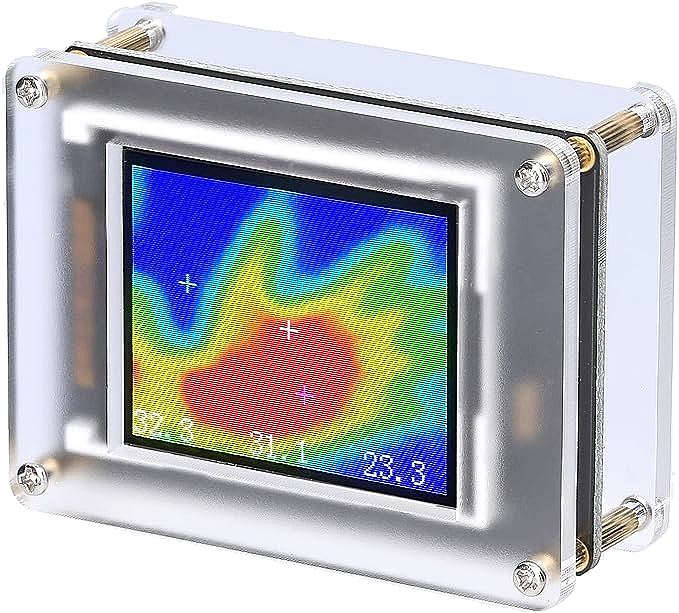
In the previous exploration, we delved into the invisible world of infrared physics, understanding how vibrating atoms emit energy that sensors can detect. We established that devices like the Weytoll Handheld Infrared Thermal Imaging Camera act as translators, converting this energy into a visual spectrum we can comprehend. But possessing a translator is not the same as being fluent in the language.
Thermal images, especially those from entry-level, low-resolution sensors, are notoriously ambiguous. They offer data, but they do not offer answers. A red splotch on a wall could be a missing piece of insulation, a hot water pipe, a reflection of your own body heat, or even a patch of moisture. To turn a budget thermal camera from a novelty toy into a useful diagnostic tool, one must move beyond passive looking and adopt an active methodology of interpretation.
This guide outlines a systematic approach to “reading” heat. It focuses on how to extract actionable intelligence from coarse, 8x8 pixel data, applying rigorous logic to the colorful blurs on the screen. Whether you are hunting for drafts in a drafty winter home or trying to identify an overheating component on a vintage amplifier, the principles of thermal diagnostics remain the same: Baseline, Comparative Analysis, and Verification.
The Principle of the Thermal Baseline
The most common mistake beginners make with thermal cameras is turning them on and immediately hunting for “hot spots.” This approach is flawed because “hot” is relative. In an auto-scaling thermal camera (which most budget models are), the software constantly adjusts the color palette to fit the hottest and coldest things in the frame.
If you point the camera at a perfectly insulated wall with one tiny nail head that is 0.1 degree warmer than the rest, the camera might paint that nail head glowing red and the wall deep blue, simply because that 0.1 degree is the only difference it can see. It creates a false sense of drama.
To counter this, you must establish a Thermal Baseline.
Before diagnosing a specific area, scan the general environment to understand the “normal” thermal texture.
* Uniformity Check: Look at a known uniform surface (like an interior partition wall). How much “noise” or color fluctuation does the camera show when there is effectively zero temperature difference? This tells you the “noise floor” of your specific sensor (e.g., the Weytoll’s AMG8833).
* The Palette Span: If your device allows, look at the temperature range (min/max) displayed on the screen. If the range is only 1°C (e.g., 20°C to 21°C), the colorful image is likely showing mostly noise or insignificant variations. If the range spans 10°C or more, the colors represent significant thermal events.
Case Study: The Drafty Window
Imagine you are inspecting a window frame. Don’t just look for blue (cold) spots. First, scan the solid wall two meters away. That is your baseline “room temperature” signature. Now, move to the window. You expect the glass to be colder (different emissivity and insulation value), but what about the frame? You are looking for deviations from the baseline that suggest airflow—sharp, irregular plumes of cold that differ from the general “coldness” of the window assembly.
The Art of Comparative Analysis
With low-resolution sensors like the 64-pixel array in the Weytoll, identifying a specific object by its shape is often impossible. A rectangular breaker switch and a round wire nut might both look like amorphous warm blobs.
This is where Comparative Analysis becomes your primary tool. You rarely judge an object in isolation; you judge it against its peers.
1. The “Three Phase” Method (Electrical)
If you are inspecting a breaker panel or a 3D printer control board, look for patterns of symmetry. In a row of three identical circuit breakers carrying similar loads, they should theoretically have similar thermal signatures.
* Observation: Breaker A is 30°C. Breaker B is 32°C. Breaker C is 55°C.
* Diagnosis: You don’t need high resolution to see that Breaker C is the anomaly. The absolute temperature might be inaccurate due to emissivity issues, but the relative difference (Delta T) of 25 degrees compared to its neighbors is a confirmed fault. This is comparative diagnostics.
2. The Load/No-Load Test (Electronics)
When repairing electronics, a common strategy is to power up a board and watch the “thermal bloom.”
* Step 1: Ensure the board is at ambient temperature (cold).
* Step 2: Point the thermal camera at the suspect area.
* Step 3: Apply power.
* Step 4: Watch for the rate of change. A shorted component will often heat up instantly, flashing “red” on the sensor seconds before the surrounding board warms up. Even with an 8x8 pixel blur, the speed of the temperature rise can pinpoint the faulty area amongst a cluster of components. The Weytoll’s video refresh rate becomes more valuable here than its spatial resolution.
The “Focus” of Distance: Managing Spot Size Ratio
A critical concept in thermal measurement is the Distance-to-Spot Ratio (D:S). Every pixel on a thermal sensor sees a cone of space. The further away you are, the wider that cone becomes.
For an 8x8 sensor, the “pixel size” grows very rapidly with distance. * At 10cm distance: One pixel might cover a tiny capacitor (5mm x 5mm). You can get a decent reading of that specific part. * At 1 meter distance: That same pixel covers an area perhaps 15cm x 15cm. If you are looking at that same capacitor, the pixel is now averaging the heat of the tiny capacitor with the heat of the huge, cold PCB surrounding it. The “hot spot” will disappear or appear much cooler than it is.
The Diagnostic Rule: Fill the Pixel.
To get a valid reading or detection, the target object must be larger than the area “seen” by a single pixel. With a low-res device like the Weytoll, this dictates a “macro” approach. You must get physically close to the subject.
* For Home Inspection: Stand 2-3 meters back to see the whole door frame (gross patterns). Move to 20cm to inspect the weatherstripping (specific leaks).
* For PCBs: You literally need to be inches away. This proximity brings its own risks (don’t touch live circuits!), but it is physics-mandated. You cannot inspect a smartphone motherboard from a foot away with 64 pixels.
Overcoming the Emissivity Barrier: Practical Hacks
As discussed in the previous article, shiny metals are thermal mirrors. They lie. A loose copper wire connection in a breaker box might be scorching hot (100°C+) but appear room temperature on the camera because copper has an emissivity of ~0.05.
Since entry-level cameras often lack adjustable emissivity settings, you must modify the reality to fit the tool.
The “Black Tape” Technique
This is the gold standard for reliable thermal measurement on budget gear.
1. Preparation: Before turning on the system (if safe/possible), stick a small piece of standard black electrical PVC tape onto the metal surface you want to measure (e.g., a heatsink, a pipe, a busbar).
2. Physics: Electrical tape has a known emissivity of roughly 0.95—exactly what most thermal cameras are calibrated for. It is also thin enough that it quickly conducts the heat from the metal underneath.
3. Measurement: Point your camera at the tape, not the bare metal next to it. The tape acts as a “thermal proxy,” radiating the true temperature of the metal in a language the camera understands.
The “Matte Spray” Alternative
For larger inspections (like a complex manifold or engine part), applying a quick spray of non-permanent matte powder (like foot powder spray or dry shampoo) can temporarily render a shiny surface non-reflective, allowing for an accurate thermal scan. Note: Always ensure this is safe for the specific equipment.
Detecting the Invisible: Moisture and Structure
Thermal imaging isn’t just about heat; it’s about thermal mass and evaporative cooling. This allows you to “see” things that aren’t generating heat themselves.
1. Moisture Detection
Water has a high thermal capacity (it changes temperature slowly) and it cools surfaces as it evaporates. If you scan a ceiling after a rainstorm, a wet patch will often appear distinctly colder (blue) than the surrounding dry drywall, even if the surface feels dry to the touch. The water inside the gypsum is acting as a heat sink.
* Method: Heat the room slightly (turn up the thermostat). The dry drywall will warm up faster than the wet drywall. This transient thermal test enhances the contrast, making the wet spot “pop” on the screen.
2. Finding Studs and Joists
You can often find the wooden framing behind a wall without a stud finder. Wood acts as a thermal bridge (or insulator, depending on the delta).
* Winter: The wood studs conduct cold from the outside slightly more (or less) than the insulated fiberglass cavities between them.
* Method: Wait for a night with a significant temperature difference between inside and outside. Scan the wall. You will likely see faint, regularly spaced vertical stripes. These are the studs. The 8x8 resolution is actually perfect for this, as studs are large, linear structures that align well with the blocky pixel grid.
Conclusion: The Analyst Behind the Lens
The Weytoll Handheld Infrared Thermal Imaging Camera and its kin are tools of revelation, but they are not magic wands. The colorful image on the screen is not the truth; it is a raw data visualization that requires decoding.
The power of these devices does not come from their pixel count. It comes from the user’s ability to apply logic. It comes from understanding that a shiny pipe lies about its temperature, that a distant hot spot will fade into the background average, and that a single “hot” pixel is meaningless without a baseline for comparison.
By adopting a rigorous methodology—establishing baselines, using comparative analysis, managing distance, and accounting for emissivity—you transform a $70 gadget into a serious diagnostic instrument. You stop simply looking at colors and start understanding the thermal narrative of your home and your devices. In the end, the most important component of the thermal imaging system is not the sensor array, nor the processor, nor the display. It is the informed mind of the operator.